Minimal example of qp_flexzboost usage
This notebook covers the most basic usage of qp_flexzboost.
[1]:
import qp
import qp_flexzboost
For demonstration purposes, we’ll use small set of test data included with qp_flexzboost.
Here we assign a set of pre-defined basis function weights to the variable weights.
[2]:
# Initailize data typically used for unit testing
qp_flexzboost.FlexzboostGen.make_test_data()

# Assign the instantiated basis function weights to ``weights``.
weights = qp_flexzboost.FlexzboostGen.test_data['weights']
Next we instantiate a qp.Ensemble object that contains the collection of qp_flexzboost distribution generators.
The values passed in the dictionary to data are used to define the initial conditions when the model was trained and specify parameters for post-processing.
Note: No ML training occurs here. The model that produced the basis function weights was trained earlier. Here we just need to pass the parameters used to train the model.
[3]:
fzb = qp.Ensemble(
    qp_flexzboost.flexzboost,
    data=dict(
        weights=weights,
        basis_system_enum_value=1, # Corresponds to a set of cosine basis functions.
        z_min=0.0,
        z_max=3.0,
        bump_threshold=0.1,
        sharpen_alpha=1.2))
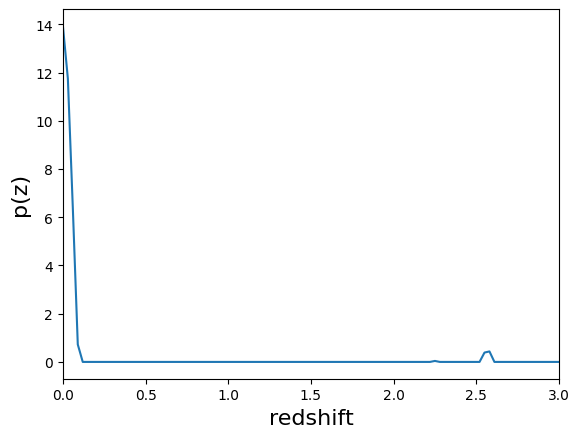
Now that we have a small qp.Ensemble instantiated, we can plot an example PDF as show below.
[4]:
qp.plotting.plot_native(fzb[6], xlim=[0,3])
[4]:
(<Figure size 640x480 with 1 Axes>, <Axes: xlabel='redshift', ylabel='p(z)'>)
For more detailed examples, please see the other notebooks.